Use this process only when reinstating a returning member who has an existing record in the MiClub Golf database (Active or Inactive Members) but does not have an existing record in the MiMembership database.
Important: If the returning resigned member already has a record in MiMembership, do not use this process. Instead, follow the instructions in How to Reinstate a Resigned Member.
Step-by-Step Guide
Step 1 – Retrieve the Member's Existing Membership Number
- Log in to the MiClub Golf database.
- Navigate to the Members' Directory.
- Search for the returning member in the Active and Inactive member directories.
- Locate the member's existing record and retrieve their Membership Number.
Important: You must use the Membership Number, not the Golf ID Number.

Step 2 – Create the Returning Member Record in MiMembership
- Log in to the MiMembership database.
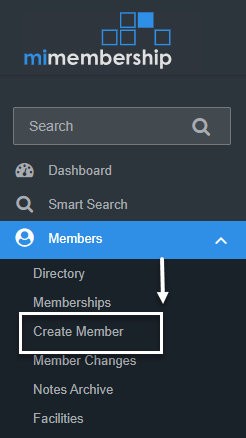
- From the main menu, navigate to Members > Create Member.
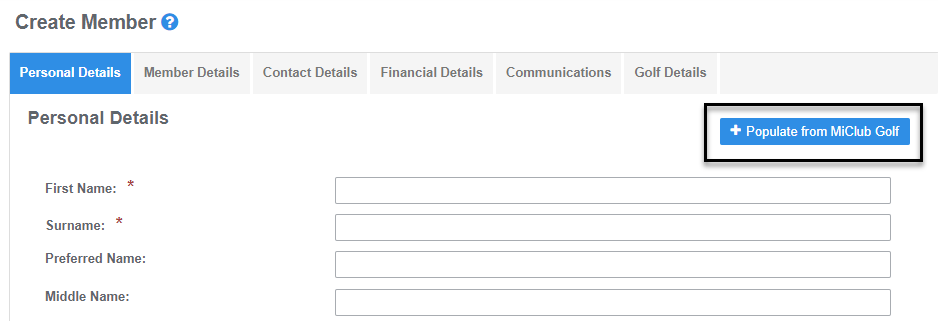
- Click the Populate from Golf button. This will open a dialogue box.
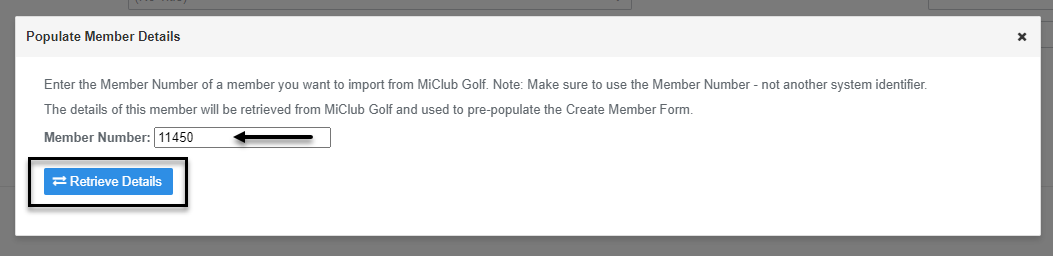
- Enter the Membership Number retrieved in Step 1 into the Member Number field.
- Click Retrieve Details.
- The member's existing details from the MiClub Golf database will automatically populate the matching fields in the Create Member process.
- Review the retrieved information and enter or update any additional member details as required.
- Click Next to progress through each section of the Create Member process.
- Once all required details have been entered, click Save to create the member record in MiMembership.
Step 3 – Add Membership Groups and Create an Invoice
Once the member record has been created, add the appropriate membership group(s) and create the relevant membership invoice.
For instructions, refer to How to Add Membership Groups.
Was this article helpful?
That’s Great!
Thank you for your feedback
Sorry! We couldn't be helpful
Thank you for your feedback
Feedback sent
We appreciate your effort and will try to fix the article