Show and Hide Columns
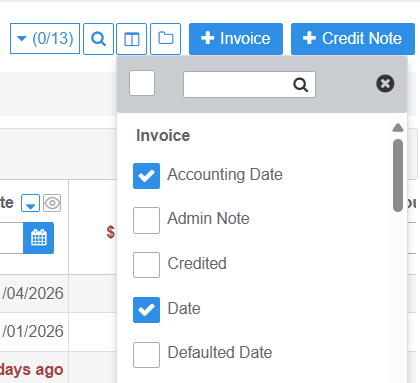
The Show / Hide Columns button can be used to manage the display of the default information you want to see in data tables, and to fit content onto smaller screens.
Wherever you see this button you can click to select the table columns you want to display. The column options are listed alphabetically and divided into sections based on the repository the table data stored
 |  |
Sort and Filter Columns
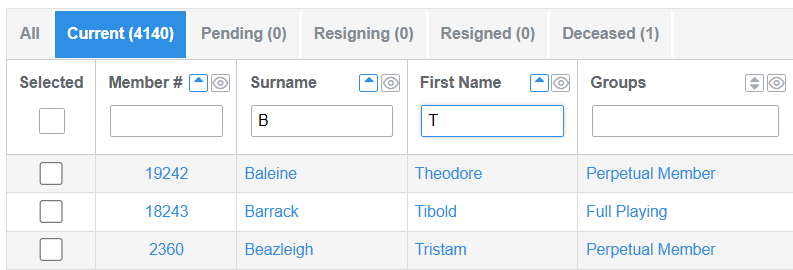
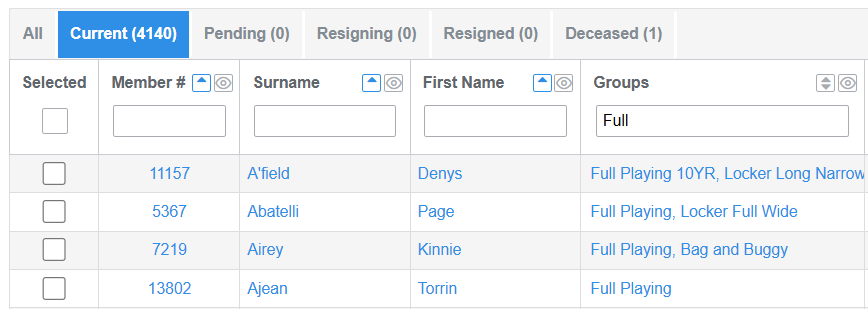
Filter the display of table data by typing in the column header text inputs: Surname, Member #, Group, etc
Filter table data by typing in the column header input fields:
- In the members directory, filter on members with last name starting with B and First name starting with T
- Filter all members in Full Playing Group
- Reports: fun an age report and change the sort order on count
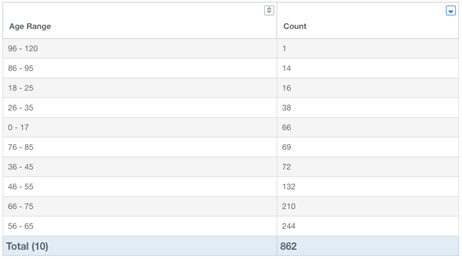
When you see these arrow buttons in a table header (reports) you can change the sort order of the data:

Blue indicates the column that is actively sorted - Ascending/Descending (up/down )
Was this article helpful?
That’s Great!
Thank you for your feedback
Sorry! We couldn't be helpful
Thank you for your feedback
Feedback sent
We appreciate your effort and will try to fix the article