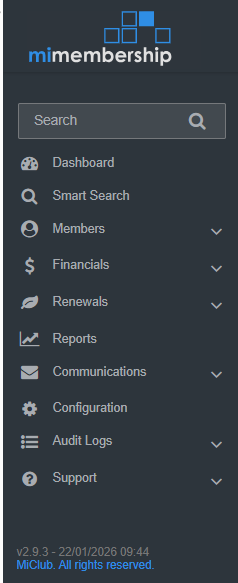
The key areas of MiMembership can be accessed through the main menu which is located on the left hand side of the screen. A number of repositories can be accessed from within each key area. Below is a brief description for each of these key areas.
Repository: A central location in which data is stored and managed
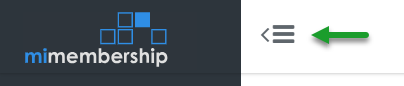
Tip: Use the collapse action to open or hide the main menu to increase or decrease your working screen space
1. Quick Search
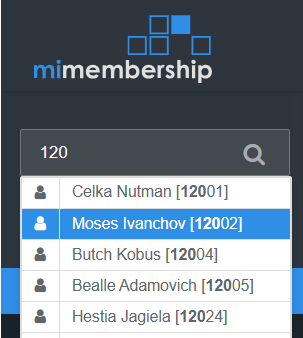
Search the database for members, invoices, payments, etc.
Enter a name or number in the search field and select an option from the results menu
2. Dashboard
Features data widgets that alert the user to important information. It can be personalised with widgets that are relevant to your job.
Click here for information on how to Add, Edit & Remove widgets.
3. Smart Search
Allows the user to interrogate the database to build a list of Members, Invoices, Payments, Statements, Payment Plans, Memberships and more based on specific search criteria. You can then perform a bulk action on that results list. Click this link for more information on how to create and run a smart search: Smart Search >
4. Members
Everything to do with individual member records, creating members and managing memberships
- Directory: a repository of all individual member (and debtor) records
- Create a Member: use this action to create a new member record
- Memberships: a repository of the status and movement of memberships and groups
- Notes Archive: - a repository of all notes added to member records
- Facilities: a repository of all current, past and future allocated facilities
- Relationships: a repository of linked member or debtor records
- Member Draw: optional paid module. Run and edit member draws
- Form Submissions: optional paid module. Online membership sign up form submissions for approval
Click here to find step by step guides to actions the various processes within the Members area.
5. Financials
Everything to do with financials including invoices, payments, payment plans, accounts and transactions.
- Invoices: a repository of all outstanding, overdue, defaulted and paid invoices
- Payments: a repository of all payments including refunds and reversals
- Statements: a repository of all statements and generate new statements
- Accounts: a repository of all accounts and current balances
- Account Transactions: a repository of all account transactions including invoices, credit notes, payments, POS transactions and external transactions
- Payment Plans: a repository for all current, completed and closed payment plans
- Payment Plan Instalments: a repository with all upcoming, overdue, defaulted and paid instalments. Send upcoming instalments to payment gateway for processing and manage dishonoured and failed instalments
- POS Transactions: optional paid integration. All member account charges and payments generated from the integrated POS system
- Quotes: a repository for all pending, accepted, rejected and expired quotes. Generate new quotes
- External Transactions: optional paid integration. All member account credits generated from an external integration system i.e. MiClub Golf competition prizes
- GL Integration: optional paid integration. All financial journals and batches sent, or available to send, to the GL. View, print and export detailed journals
Click here to find step by step guides on how to action processes within the Financials area.
6. Renewals
A wizard to guide you through creating membership renewals and invoices. History links to past renewal batches. More information about renewals and pre-planning, including videos, can be found in these links:
7. Reports
Standard system reports for members and memberships, financial, communications, general ledger and configuration.
Click here to review the reports glossary and instructions on how to run a report.
8. Communications
Create new email or SMS messages, find past messages and message history.
- Send Email: create and send an email to individual or multiple members
- Send SMS: optional paid module. Create and send an SMS to individual or multiple members
- Draft Emails: a repository of draft emails not sent
- Past Emails: a log of all email messages created and sent. View and resend emails
- Email History: a log of all emails sent by type
- Email Requests: pending and failed requests. Resend and troubleshoot bad requests
Click here for more information and instructions about sending messages.
9. Configuration
Settings for all variable options of the site such as communication templates, member custom fields, membership groups, charges and payment plan templates.
- Communications: update default email content and document templates. Create new email templates and manage email processes
- Members: create and manage membership groups, facilities and custom fields
- Financials: create and mange account types, charges, payment plan templates and payment methods. Add chart of accounts for GL integration
- Security: create new and manage MiMembership user access
- Integrations: connect to the various third party applications connected to your MiMembership site
- Sign-up Form: optional paid module. Update your online application and membership group settings
- Shares: optional paid module. Manage your share registry settings
10. Audit Logs
Information on activity that has occurred on the site including member timeline changes and updates. A good place to check what emails were sent and if integrations are running correctly.
11. Support
Find online manuals and solutions to your problem, report an issue to the MiMembership help desk or request a personalised training session. Includes links to your third party provider and integrated system web portals i.e. MiClub Golf, Payrix and SMS Global.
Was this article helpful?
That’s Great!
Thank you for your feedback
Sorry! We couldn't be helpful
Thank you for your feedback
Feedback sent
We appreciate your effort and will try to fix the article